I’ve loved Rust for a long time. Its strengths are obvious, but so are its weaknesses. It offers memory safety without garbage collection, zero-cost abstractions, concurrency safety, arguably the best toolchain and surrounding ecosystem available today, an extraordinary range of applications—from cloud web servers to microcontrollers—and an excellent error-handling design. The drawbacks? A steep learning curve? Difficulty understanding the constraints imposed by models such as ownership and borrowing? Slow to write?
For a long time, we all regarded these as Rust’s shortcomings. In reality, the first two can be overcome by training the way we think and understand things, but slow compilation has continued to drag down my workflow. A few years ago, that seemed fine: before AI swept in, patience was what I had, and I would often stay up until dawn working on an algorithm or feature. But now? I can hardly claim I haven’t changed. I have become utterly impatient: I do not want to think about how to write Rust code, I cannot stand waiting for Cargo’s interminable progress bar, and the ld stage is especially bad because it shows no progress at all—it just sits there every time. It is genuinely painful.
Is there really no solution to all this? Actually, there is. About a month ago, I tried several ways to speed up my Rust development process, including workflow optimizations, but nearly all the waiting still came down to Cargo. Unless that problem is solved, everything else merely treats the symptoms. So I’ll take this opportunity to briefly discuss tuning Cargo.toml for Rust development, along with the supporting configuration around it.
Backend Theory
In Rust’s design, LLVM is a bit lazy, but it’s a very good choice. Unlike Go, which maintains its own whole process of converting code to machine code, Rust lets the massive LLVM ecosystem handle mature optimizations, which is actually beneficial. The overall Rust compilation pipeline can be roughly described as follows: source code first undergoes lexical analysis and syntax analysis to produce an abstract syntax tree (AST); then macro expansion and HIR lowering (flattening) are performed. After that, regular type checking and a small amount of borrow checking take place, finally generating the mid‑level intermediate representation (MIR). Up to this point, all work is done by the Rust compiler’s own front end.
The work after MIR is handed over to LLVM: it translates MIR into LLVM IR, then LLVM runs its series of optimization passes (ranging from O0 to O3), finally generating machine code for the target platform, which is then handed to the linker to assemble into a binary executable.
So where exactly is the problem? The answer is actually quite simple: LLVM is heavyweight infrastructure, and being heavyweight is appropriate in production. Trading compilation time for execution speed is a sound philosophy. It bridges high-level languages such as Rust, C, C++, Swift, and many others. This means its optimization pipeline is designed to “generate optimal machine code,” not to “finish compilation quickly.” Running its dozens of optimization passes in release mode is extremely time-consuming. Even at O0 in debug mode, LLVM must still complete the entire process of generating IR and machine code, which is not lightweight in itself. On top of that, Rust’s monomorphization of generics expands a large amount of code during compilation, so the IR handed to LLVM is far larger than the source code suggests, naturally causing LLVM’s workload to balloon as well.
Cranelift
So essentially, a large part of the slow compile time isn't spent in Rust's own frontend but in LLVM, that "heavyweight backend". Which raises the question: could we just drop it? There is a backend called Cranelift built for exactly this need. It started life as Cretonne in 2016, developed by the Bytecode Alliance, a code generation backend designed in the first place Wasmtime; it was later adopted by the Rust project as an optional codegen backend.

 A low-level retargetable code generator.
 So where exactly is Cranelift supposed to be faster? Its ideal stage is development, when you may not need nearly perfect machine code optimized to the absolute limit of execution efficiency at all—you may just need fast feedback. It is enough for this less-than-stellar machine code to be semantically equivalent to the machine code properly generated by LLVM. Early versions of Cranelift could not actually guarantee that because of numerous edge cases. Those still exist today, but things have improved considerably: the likelihood of Cranelift working while LLVM breaks is now roughly the same as that of your Rust code triggering an internal compiler error in rustc. To produce machine code optimized to the extreme, LLVM runs dozens of optimization passes—loop unrolling, vectorization, constant propagation, dead-code elimination, and many, many others—polishing the code layer by layer. Cranelift follows a completely different design philosophy: it drastically reduces these optimization stages, performs only basic register allocation and instruction selection, and completes code generation with a single linear scan instead of iterating repeatedly. Its intermediate representation is also more lightweight, designed specifically for rapid translation from a higher-level intermediate representation into machine code, unlike LLVM IR, which carries decades of general-purpose baggage.
So much for the upsides -- what about the price? The obvious one is that code from Cranelift runs slower than code from LLVM, roughly 10%~30% slower depending on the workload. But once you let go of it, you realise this hardly matters during development. What do I need that speed for? Am I running a benchmark, or a CI release build? I just want cargo build to finish faster so I can see whether the logic came out right. And I'll bet most of the programs you write can't possibly saturate the machine more than 80% of the time -- there has to be actual work coming in, and how much of that is there while you're developing? Your CPU is probably the entire time, while I'm the one who needs to see the result and check the logic. So compile time traded for runtime speed -- shouldn't that sum be worked out the other way round inside the development loop?
Code generation units
As for codegen-units, it is a parameter that controls how many minimal units the compiler divides a crate into for parallel processing by the back end. By default, there are 256 units in debug mode and 16 in release mode. The higher the number, the greater the parallelism and the faster the compilation, since multiple CPU cores can perform back-end code generation simultaneously. The trade-off is less effective optimization: because each unit is optimized independently, LLVM (or Cranelift) has less context, leaving fewer opportunities for cross-unit inlining and optimization.
For an actual release build, however, you should generally use the opposite extreme, codegen-units = 1. Only then can the output be optimized to the fullest. After all, if you’re already using Rust, isn’t trading compilation time for runtime performance only natural?
Optimization Level
Another often-overlooked but adjustable setting is opt-level. It defaults to "3", but for release builds it is more common to set it to "z". This gives you a free reduction in artifact size without changing any code, so why not enable it? For development builds, however, it should be set to "0", since disabling optimization entirely provides the fastest build speed.
Another handy trick is that Cargo.toml lets you set different optimization levels for dependencies and your own code:
[profile.dev.package."*"]
opt-level = 3
This lets you compile third-party dependencies with O3, which only increases the time required for the initial clean build; subsequent builds are incremental. External dependencies generally do not change often, so using O3 for them and O0 for your application code usually provides a good development-mode experience that balances speed and binary size. For release mode, however, I still recommend turning optimization all the way up with O3 or Z—there is not much else to say.
Link-Time Optimization
LTO (Link-Time Optimization) is another feature that consumes a great deal of memory and compilation time, yet enabling it for release builds is recommended for most projects. In a normal build, each crate is optimized independently, so the compiler backend cannot see call relationships across crates and therefore cannot perform certain cross-crate inlining and dead-code elimination—situations that occur very frequently. LTO breaks down this boundary, giving the optimizer the IR of every crate at link time so it can perform a single global optimization pass. However, never blindly add lto = true directly to a profile, as it will make Rust compilation painfully slow; check carefully and enable it only when using the release profile.
Remove Debug Symbols
As with everything else, Rust’s debug information and symbols are stored here. Enabling strip in release mode can reduce the size tremendously (usually 50 MB vs. 5 MB)—an absolutely staggering difference. Removing symbols is also safer, since frontend source code leaks usually happen when source maps are accidentally published to npm :(
So there is not much to say about the development profile—you cannot exactly strip the debugging information, since that would prevent you from debugging normally with gdb / lldb and leave the stack trace without meaningful function names. Note, however, that Arch Linux strips it for you by default when packaging. This causes a slight conflict here: because we have already stripped it, an error may occur later. Keep this in mind when writing an AUR package and explicitly skip this step.
Give Up Panics!
In ordinary application code, panic should not exist. Whenever application code encounters an error at runtime, any Err covered by a fault-tolerance design should be returned safely instead of causing an abrupt panic. Like React ErrorBoundary, it should be handled normally as an error. A panic should be triggered only when the code is certain that it has entered an impossible, unrecoverable state. My personal philosophy is to abandon panics. Why? Because application code can effectively be tested in three layers: first the successful path, second an error path—one of infinitely many possibilities—and only then the edge cases exhaustively uncovered by fuzzing or collision testing. From an engineering perspective, the successful path can be tested with 100% coverage, while one of the n variants in each category of error paths can be selected. Collision testing is purely a matter of time and is usually not worthwhile. Once your user base truly grows large enough, you will know when you need it; as a rule, I never do it.
Good code should therefore include tests covering one class of success paths and at least one failure path. Covering a single case from that class of failure paths is enough to test that the error is returned as an Err, allowing you to write fallback logic and naturally enumerate it with thiserror or intercept, flatten, print, and log it with anyhow. In short, your code forces you to build mechanisms for handling these situations. Once you reach this level, panic is useless to you: you can think of it as "theoretically impossible," but only theoretically. The real world still has operating-system errors, memory errors, single-bit flips caused by cosmic-ray electrons, bizarre overflows... You can never cover every such situation. So why avoid panics? Because there is a good chance—a 90% chance—that these situations are not caused by your code. The essence of panic is that, when it occurs, Rust walks back up the call stack one level at a time, invoking the destructor (drop) in each frame to clean up resources. This requires the compiler to generate an additional unwind table to help locate errors in your business logic. If the error itself probably is not yours, what value does that information have? Keeping it also increases the size of the compiled artifact and gives the linker more work, so disabling it is the right choice. If your code is thoroughly tested and you are sufficiently confident, I recommend configuring panic = abort.
Benchmarks
Enough talk—let’s see the actual gains from these combinations, using a small toy project I made a few months ago as a reference.
The Rust portion of this project contains roughly 32K lines of source code, excluding dependencies.
This repository is actually a monorepo containing many subprojects, but two representative examples stand out. The characteristics of the Skeleton package are immediately apparent: it has a large codebase and very few dependencies. Code generation will account for a larger share of this package than of any other in the project, making it particularly well suited to Cranelift. The package is also very clean—“clean” here means that it consists entirely of safe Rust.
By contrast, the following CLI package is not such a good fit. Its many dependencies are not really a problem—in theory, they should demonstrate the performance gains more clearly—but it presents a classic either-or choice: in the upper-left corner, the ring dependency is marked as optional. That is because the project originally used aws-lc-rs; both are cryptographic algorithm backends for Rust. Why make it optional? Because ring is written entirely in Rust, whereas the other is assembly brought in through FFI and specifically optimized for mainstream CPU architectures such as x86 and arm64. Yet that is also its weakness: Cranelift’s magic is confined to pure Rust. Once unsafe code, C or ASM through FFI, or anything similar is introduced, Cranelift’s compatibility becomes extremely poor.
But this is not unsolvable: you can select the backend with cfg and compile with ring in Cranelift mode. After configuring the development and release profiles as described above, a simple comparison of CLI compilation shows that development builds are at least three times faster than release builds—even with cold, non-incremental compilation. With O0 and link-time optimization disabled, the development profile should be dozens of times faster than the release profile during subsequent incremental updates. This is because techniques such as link-time optimization work by flattening the boundaries between packages; once everything becomes a single unit, changing one piece of code forces the whole unit to be recompiled, preventing proper incremental updates.
![A screenshot of a dark macOS terminal window titled `~/C/P/seam`, filled with the tail of a Cargo release build: roughly forty cyan "Compiling" lines listing third-party crates with versions — walkdir v2.5.0, rand v0.10.0, tungstenite v0.29.0, sha2 v0.10.9, clap v4.6.0, rquickjs v0.11.0, notify v8.2.0, indicatif v0.18.4 — followed by the project's own workspace members at v0.5.38, each with its path: seam-codegen, seam-skeleton, seam-injector-wasm, seam-engine-wasm, seam-server, seam-server-axum and seam-cli under `/Users/canmi/Canmi/Project/seam/src/`, then four v0.0.0 example crates (demo-server-rust, github-dashboard-axum, markdown-demo-rust, i18n-demo-axum). The last line reads `Finished \`release\` profile [optimized] target(s) in 1m 05s`, with the shell prompt `canmi@xyy ~/C/P/seam (main)>` waiting below. It is evidence of a clean, warning-free release build of the whole seam workspace — library, server adapters, CLI and all bundled examples — completing in just over a minute on the main branch.](https://cdn.ffoni.com/object/e8b530aa153a78f1cdea3d2980f80ecd.avif)
![A macOS terminal screenshot, titled `~/C/P/seam`, showing the tail of a successful Cargo build: about thirty cyan "Compiling" lines scroll past, starting with third-party crates (console v0.16.3, reqwest v0.13.2, clap v4.6.0, tokio-tungstenite v0.29.0, notify v8.2.0, wasm-bindgen-macro v0.2.114) and ending with local workspace members at v0.5.38 — seam-codegen, seam-server-axum, seam-skeleton, seam-injector-wasm, seam-engine-wasm and seam-cli — followed by four v0.0.0 example crates under `examples/` (github-dashboard rust-axum backend, i18n-demo backend, markdown-demo server-rust, standalone server-rust). The final line reads `Finished \`dev\` profile [unoptimized + debuginfo] target(s) in 19.23s`, and the prompt returns as `canmi@xyy ~/C/P/seam (main)>`. It is evidence that the seam workspace — a Rust project split into CLI, server-adapter, codegen and WASM engine/injector crates plus several example backends — builds cleanly on the `main` branch in roughly twenty seconds.](https://cdn.ffoni.com/object/71aa2631cd4c616d2ecca6e510cf06f4.avif)
Taken together, the results show that the two are actually pretty similar. It is not a qualitative leap, but the difference is definitely noticeable. The main reason is that Apple Silicon is so powerful: the M-series chips have absurdly strong single-core performance and memory bandwidth, which plays directly to the strengths of compilation workloads that are both compute- and I/O-intensive. The gap would generally be wider on Linux, but if you installed something like Asahi Linux on a MacBook, Linux would undoubtedly win.
The legacy linker
On Linux, Rust uses GNU ld (bfd) by default—yes, the oldest and slowest one. It is single-threaded, and both symbol resolution and relocation are performed through serial scans, so it becomes a clear bottleneck as projects grow. On Linux, you can try mold, written by @Rui Ueyama; configuration is as simple as adding one line to .cargo/config.toml.
[target.x86_64-unknown-linux-gnu]
linker = "clang"
rustflags = ["-C", "link-arg=-fuse-ld=mold"]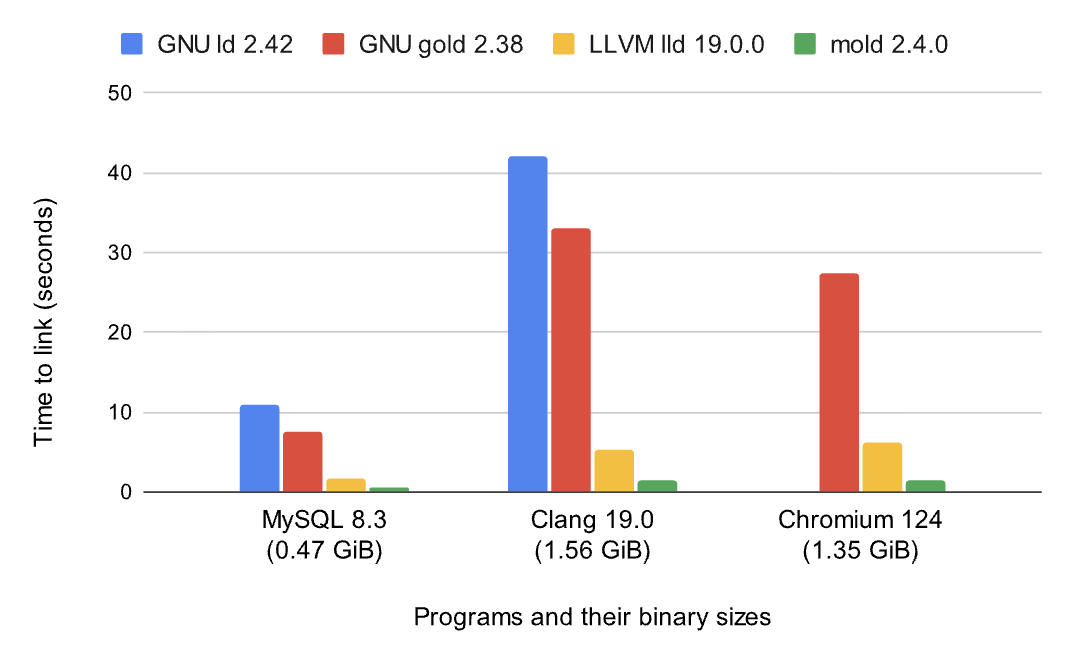
The improvement is quite noticeable, but unfortunately the only option on macOS is sold, a commercial project. The good news is that lld on macOS and Apple’s bundled ld64 are already fairly fast, especially the new linker introduced with Xcode 15, which delivers a dramatic speed boost. Its only drawback is that unattended macOS CI machines must accept a license agreement with sudo after every update, which has caused my scheduled CI jobs to fail several times.
MUSL vs glibc
I'm a who can't stand GNU glibc, but for development I'd still recommend x86_64-unknown-linux-gnu. Why? Because it's fast. MUSL's biggest selling point is that it can produce fully statically linked binaries — nothing on the system's dynamic libraries, so you copy the built artifact to any Linux machine and it just runs, which is perfect for containers and embedded work. But the slowness comes from that same static linking: the linker has to pack everything in, so the link stage is a lot more work than dynamic linking.
The good news, though, is that if you use macOS, you do not need to worry about any of this: aarch64-apple-darwin is currently the only option. By design, macOS does not support fully static linking, which is actually beneficial in terms of compilation speed. So the development profile uses GNU libc on Linux and libSystem on macOS, while the release profile can use musl on both macOS and Linux. Because of macOS’s default choices for the linker and archiver, the only thing worth noting is that you may need to configure .cargo/config.toml.
[target.x86_64-unknown-linux-musl]
linker = "x86_64-linux-musl-gcc"
ar = "x86_64-linux-musl-ar"
As an aside, definitely don’t use Zig: zbuild currently has major problems on Rust Nightly. When cross-compiling from a Linux x86 host, I recommend cross with Docker; it works very well and includes complete environments. It is also a great option if you prefer glibc. Because glibc only maintains backward compatibility, the usual rule of thumb is to compile against the glibc version shipped by Debian two major releases earlier; otherwise, an overly recent glibc will prevent the program from running on a great many machines. This is not because you used some new feature—it simply checks the version in a string to spite you. If the host is a Mac, use rustup’s native target + cargo build --release
UPX Is Bad
Another point worth discussing is the use of UPX; I know I said I like musl, but wanting a small binary at the same time is actually rather contradictory and sounds unreasonable...
                 ooooo     ooo  ooooooooo.  ooooooo  ooooo
                 `888'     `8'  `888   `Y88. `8888    d8'
                  888       8    888   .d88'   Y888..8P
                  888       8    888ooo88P'     `8888'
                  888       8    888           .8PY888.
                  `88.    .8'    888          d8'  `888b
                    `YbodP'     o888o       o888o  o88888o


                    The Ultimate Packer for eXecutables
   Copyright (c) 1996-2026 Markus Oberhumer, Laszlo Molnar & John Reiser
                           https://upx.github.io
In practice, however, UPX solves this problem. It works by compressing your binary and wrapping it in a decompression stub; at runtime, the binary is first decompressed in memory and then executed. This can reduce its size to roughly 30%–50% of the original, making the size advantage substantial. But this is precisely why combining UPX with GNU glibc dynamic linking can cause serious problems: dynamically linked glibc binaries contain special sections and use dynamic-loading mechanisms that UPX may damage during compression, potentially leaving the runtime unable to locate dynamic libraries segment fault. Musl, by contrast, is extremely well suited to UPX: its binaries are already fully static and have a stable internal structure, so UPX can compress and decompress them cleanly. Adding a UPX step to the release CI for musl builds is therefore a major plus.
UPX should not be overused, either. It is suitable only for long-running or infrequent tasks. Long-running tasks are a good fit because UPX has to decompress the executable in memory at startup; although this happens automatically and adds only a little cold-start time, the impact can still be severe on hot paths. A task that starts once and then keeps running in the background is therefore ideal. However, I do not recommend blindly applying UPX to packages in docker images for long-running services, because this effectively trades memory for disk space and is an awful bargain; container Layer compression already serves the same purpose as UPX by reducing download size during distribution. Some CLI use cases are a much better fit: they save a great deal of disk space, the startup decompression delay is almost imperceptible, and musl is naturally well suited to CLIs. Otherwise I would have to call out AUR helpers—one of those things was written in go but not statically linked, so I once had yay break on ArchLinux because it could not find a dynamic library. Since it was itself a system-management tool, there was no direct fix; I had to boot a separate LiveISO and finally chroot into the system to rescue it.
Summary
Although these handy settings help you quickly distinguish the development and release profiles—and the benefits only become clearer as the codebase grows—I still recommend adding a CI job that runs a Rust stable LLVM build, preferably alongside all your tests. That way, you will not need to switch away from nightly Rust locally, edge cases will not trip you up, and CI will catch any problems as soon as you push, which is currently the most comfortable developer-experience workflow. That is all for this time; I will tinker with it again when I have time.